Private AI Workflows on One NVIDIA DGX Spark: n8n, vLLM and LiteLLM With No Cloud API
n8n served seven models from one 128GB DGX Spark behind a single OpenAI-compatible endpoint. Qwen3.6-35B-A3B ran at 120 tokens per second for one user and 359 in total for eight, but image generation cut chat speed to a third.

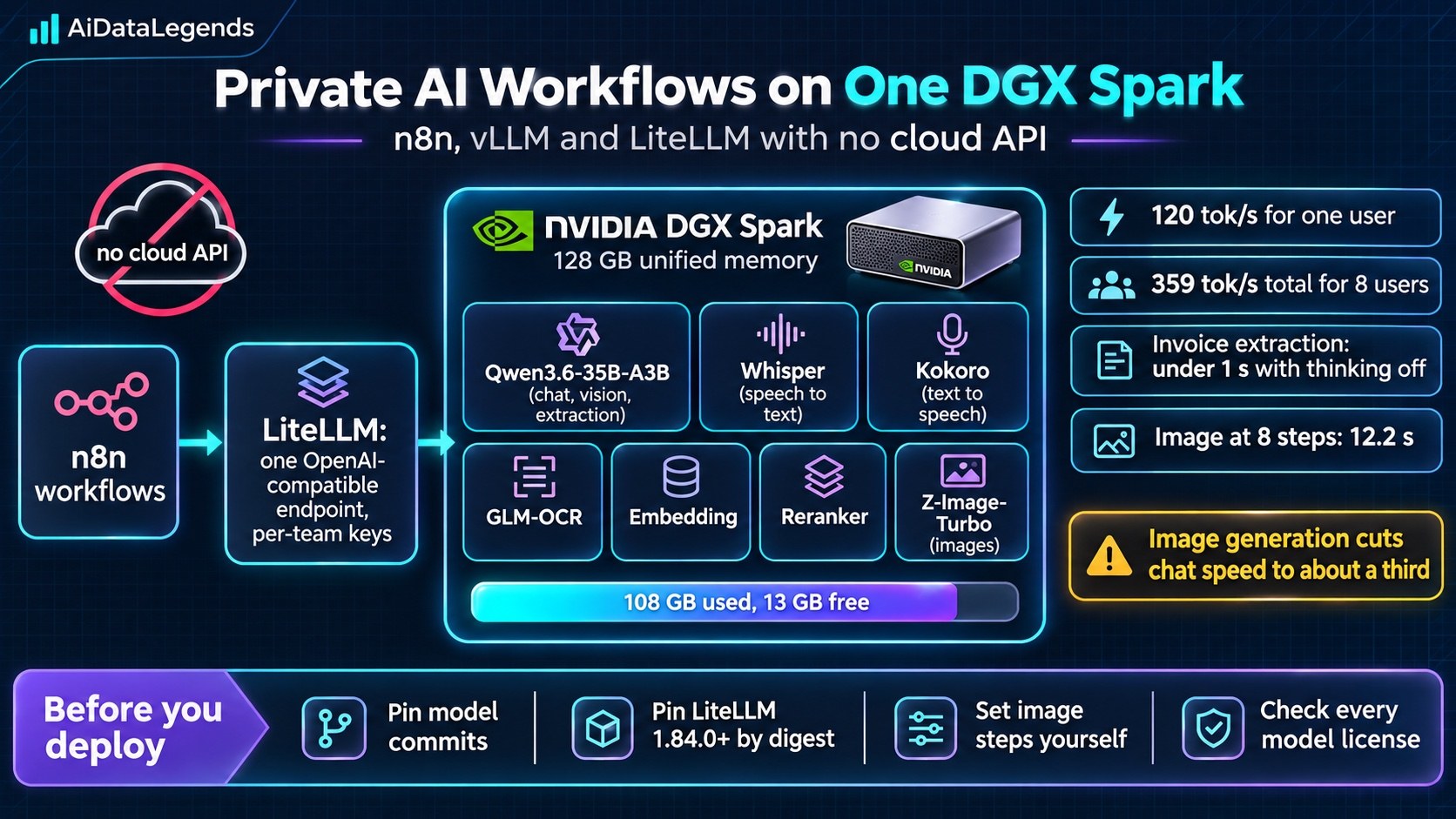
Plenty of small businesses want AI to draft emails, summarize calls and read invoices, but cannot send customer data to a cloud API. A clinic, law firm or accountant may be bound by contract, regulation or professional duty to keep records under their control. n8n has published a detailed build that serves every model those workflows need from one NVIDIA DGX Spark, behind a single OpenAI-compatible endpoint that n8n’s OpenAI nodes already speak [1]. It is a practical recipe, and its measurements show both what one box can do and where it runs out.
Why it matters
Local inference is usually pitched at one developer on a laptop. This is the next step: a box in the office serving a whole team, with a model for each job, per-team keys and usage tracking, and no data leaving the building [1:1]. For engineers building automations in regulated settings, it shows that a private stack is now a hardware purchase and an afternoon of configuration, not a research project.
Pick models for memory bandwidth, not parameter count
The DGX Spark’s GB10 Grace Blackwell Superchip reads memory at 273 GB/s. Text generation reads a model’s active weights for every token, so fewer active bytes means faster output [1:2]. That is why the stack is built around a mixture-of-experts model: Qwen3.6-35B-A3B has 35 billion parameters but about 3 billion active per token, stored in NVIDIA’s 4-bit NVFP4 format [1:3].
The design rule that follows: one strong MoE model for everything text-shaped (summarizing, classifying, extracting, drafting, coding and reading screenshots) and a specialist model only where an LLM cannot do the job. The full stack adds Whisper for speech-to-text, Kokoro for text-to-speech, GLM-OCR, Qwen3 embedding and reranking models, and Z-Image-Turbo for images [1:4].
How it works
Serving. Each model runs in vLLM. The image that worked was the official vllm/vllm-omni:v0.30.0, which includes an arm64 build of vLLM 0.30.0. An older nightly tag silently pulled vLLM 0.19, which failed with an error that looked like a broken checkpoint, so the author recommends printing the vLLM version inside any image before trusting it [1:5].
Fitting it into shared memory. CPU and GPU share one 128 GB pool. vLLM’s --gpu-memory-utilization is a fraction of the whole pool, not of free memory, and each instance sizes its cache from what is free at start-up, so models must start one at a time. With all seven loaded, the Spark used 108 GB and had 13 GB available. Starting the stack from cold took about 12 minutes, and the main model alone took 311 seconds [1:6].
One endpoint. LiteLLM sits in front, exposing each job as a named route and handling virtual keys, teams and budgets. The backends listen only on Docker’s bridge network with a shared key, so LiteLLM is the only service on the office network [1:7].
Connecting n8n. Create a LiteLLM virtual key per team, add it to an n8n OpenAI credential with the Spark’s base URL, select the model by route name, and turn off “Use Responses API”, because the local models are served through chat completions [1:8].
What one DGX Spark measured
All figures come from one benchmark run on 13 October 2026 [1:9]:
- Chat: 120 tokens per second for one user and 359 in total across eight users, including reasoning tokens. With an 8,537-token prompt, the first token arrived in 1.14 seconds.
- Speech: 30 seconds of audio transcribed, or spoken, in under a second.
- Images: a 1024x1024 image in 12.2 seconds at 8 steps. vLLM-Omni’s default of about 48 steps took 72 seconds.
- Invoice extraction: with thinking on, the model wrote 1,538 reasoning tokens before a 78-token answer. With thinking off, it extracted all five fields correctly in under a second.
- Contention: while images were generating, chat ran at about a third of its normal speed, and images slowed from 73 seconds to between 85 and 122.
What data and AI engineers should do
- Pin everything. Record the Hugging Face commit for each model and pass it with
--revision, so an upstream change cannot swap weights or licenses. Pin LiteLLM by image digest and use version 1.84.0 or later: two PyPI releases were backdoored in March 2026, and 1.84.0 fixed two authentication bypasses [1:10]. - Turn off thinking for fixed-format extraction. It was the difference between a long wait and a sub-second answer.
- Set image steps yourself, and queue image jobs or run them out of hours. Once images are daily work, the author suggests a second Spark for media.
- Validate what the models return. OCR dropped a zero from a VAT ID, and Whisper added a “Thank you.” that was not in the audio [1:11].
- Check licenses before models. Several strong image and speech models are non-commercial. The stack allows only Apache 2.0, MIT, CC-BY-4.0, OpenMDW and the NVIDIA Open Model License [1:12].
Limitations and open questions
These are single-run numbers from one machine and one set of pinned images; the author says yours will differ. The invoice test used a clean, single-page sample, and scanned or photographed documents will be harder. With 13 GB left, there is no room for another model without removing one, and the 12-minute cold start means the stack should be running before the working day begins. NVFP4 weights currently run with 16-bit math on this vLLM build, so faster FP4 kernels for GB10 could change the numbers [1:13].
Key takeaways
- One DGX Spark served seven models for a team’s n8n workflows with no cloud API, using 108 GB of its 128 GB memory. [1:14]
- A mixture-of-experts model (Qwen3.6-35B-A3B) delivered 120 tokens per second for one user and 359 in total for eight. [1:15]
- Image generation on the same GPU cut chat speed to about a third. [1:16]
- Pin model commits and LiteLLM (1.84.0 or later, by digest), and check model licenses first. [1:17]

Discussion
Join the discussion: create a free account or sign in to comment.
No comments yet.