 AIDataLegends
n8n Bridges Workflow Automation and API Management, With Important Trade-offs
n8n combines self-hosted workflow orchestration, webhook-driven endpoints, custom code and AI integrations. It can reduce the need for separate integration infrastructure, but API security, traffic governance and production reliability still require deliberate design.

Enterprise integration has an awkward middle ground. Traditional integration platforms make it easier to connect applications and move data, while API management platforms focus on securing, governing, and operating APIs throughout their lifecycle. Engineering teams that need both workflow logic and controlled endpoints can end up stitching together multiple systems.
In an engineering article published on October 1, 2026, n8n argues that this gap leaves teams looking for a more flexible approach. The company cites an estimate that the average enterprise operates around 1,000 applications but integrates only 27% of them. Those figures are cited by n8n; treat them as industry context rather than a universal measurement of every organization.
n8n’s proposition is straightforward: combine visual workflow orchestration with code-level extensibility, webhook-based endpoints, integrations, and AI capabilities, while allowing teams to self-host.
For data and AI engineers, this creates an interesting option. A single workflow can receive an event, validate data, call several APIs, invoke an AI model, branch on the result, and return a response. But being able to expose an endpoint is not the same as operating a fully governed API platform. Understanding that distinction is the key to using n8n well.
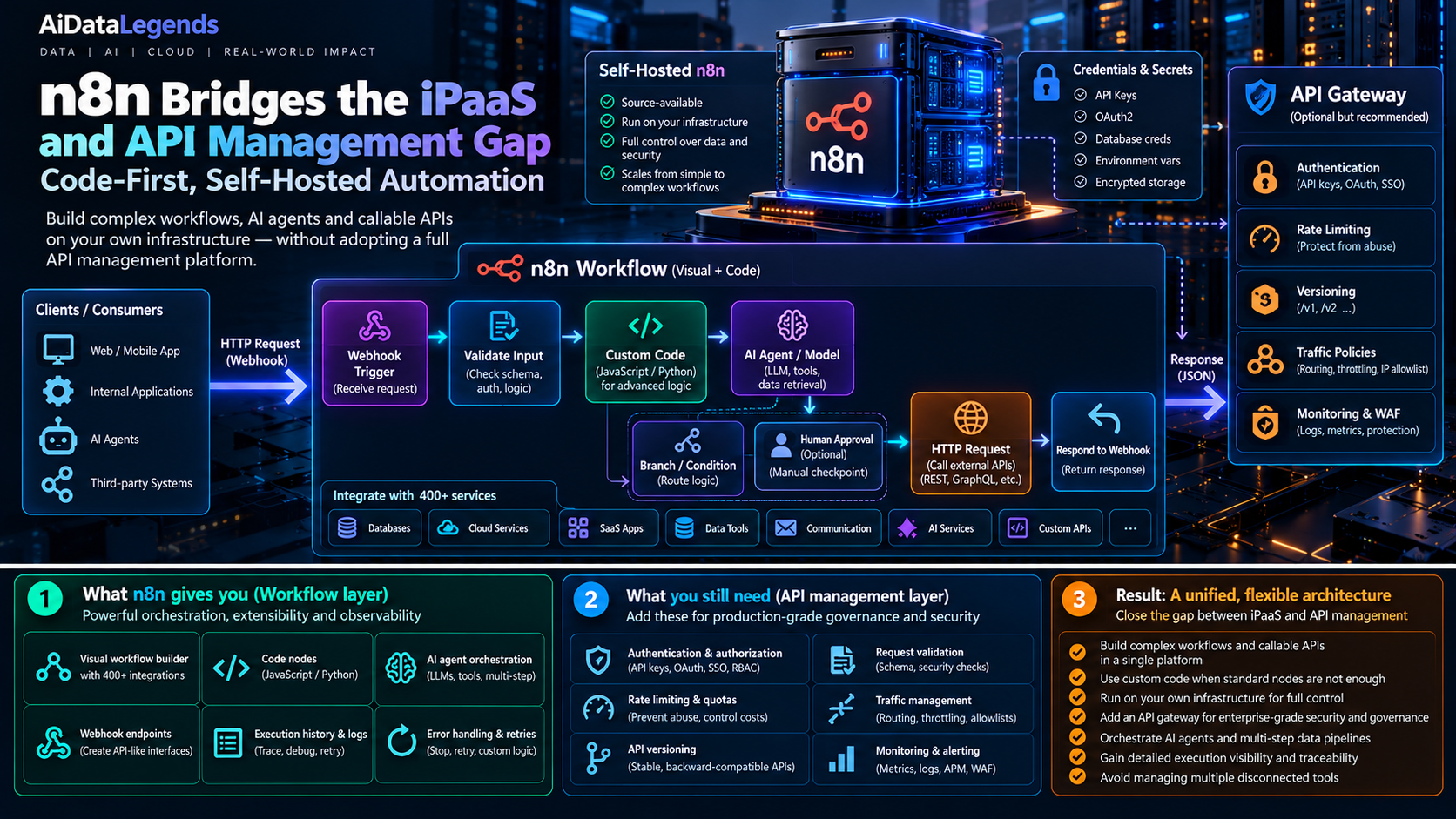
Workflow layer plus API layer: n8n orchestrates the steps; a gateway in front adds the governance an external API needs.
Why the iPaaS and API management gap matters
Integration is not just about moving information between systems. Production workflows must also handle authentication, validation, branching, retries, observability, and failure recovery. When the logic becomes complex, a collection of basic connectors may no longer be enough. When an endpoint becomes business-critical, workflow functionality alone may not provide all the controls expected from an API management platform.
n8n sits between these concerns. It provides a visual environment for connecting systems and managing execution, with a Code node for custom logic and webhook nodes for request-driven workflows. A self-hosted deployment gives an engineering team more control over its runtime and deployment environment.
That combination is particularly relevant for AI agents. An agent often needs to retrieve context from one system, call a model, invoke a tool or downstream API, apply business rules, and route the outcome to another service. n8n can coordinate those steps without requiring every integration to be implemented as a separate custom service.
However, fewer components do not automatically mean fewer risks. If a workflow exposes an endpoint to external callers, the team still needs to think about authentication, authorization, input validation, request limits, secrets, logging, and recovery. The platform can simplify orchestration; it does not remove the need for an appropriate security and operational architecture.
What n8n brings to the table
n8n describes itself as a source-available, AI-native automation platform, and advertises over 500 pre-built integrations. Its documented building blocks include:
- Webhook and Respond to Webhook nodes to receive requests and return responses.
- HTTP Request node to call external REST APIs.
- Code node to implement custom transformations and logic in supported JavaScript or Python configurations.
- Credential management to configure supported authentication methods without hardcoding secrets into workflow logic.
- Execution history to inspect runs and investigate failures.
- Error handling and retries to help workflows recover from transient problems.
These capabilities can cover a surprising amount of integration work. A workflow might receive an order event, validate the payload, retrieve customer information, call a fraud-scoring API, route the result for review, and return an acknowledgement.
The important architectural benefit is that connectivity, branching, and operational execution can live in one orchestrated workflow. The important limitation is that the workflow runtime and an API gateway solve overlapping but different problems.
How it works: from webhook to orchestrated response
A webhook-driven workflow can act as an API-like endpoint. A simplified request path looks like this:
- Receive: A caller sends an HTTP request to a configured Webhook node.
- Validate: The workflow checks the payload, required fields, and any business constraints.
- Orchestrate: Standard nodes and custom code transform the input, branch on conditions, and call downstream systems.
- Respond: The Respond to Webhook node returns a configured response when the workflow design calls for it.
- Observe: Execution history helps the team inspect the run and diagnose failures.
The HTTP Request node can connect the workflow to external services, while the Code node provides a place for logic that is awkward to express through standard node configuration. For example, a data engineering workflow could normalize an incoming event, enrich it through an internal API, and route records to different destinations based on validation results.
For AI workflows, the same pattern can coordinate model calls and tool execution. A model’s output might determine which API to call next, whether a result requires human review, or which downstream process should receive the response.
This is orchestration, not a guarantee of deterministic behavior. Model outputs can be incomplete or incorrect, external services can fail, and retries can repeat side effects. Validate AI-generated arguments before passing them to tools, and keep sensitive or consequential actions behind explicit authorization and approval controls.
An API-like endpoint is not a complete API management platform
The distinction becomes clearer when the responsibilities are separated.
| Capability | n8n workflow layer | Dedicated API management layer |
|---|---|---|
| Workflow branching and orchestration | Core use case | Usually relies on backend services or integrations |
| Connectors and downstream API calls | Built into the workflow model | Often handled by applications or integration tooling |
| Webhook-driven endpoints | Supported | Commonly supported through gateways and API products |
| Authentication and authorization | Depends on endpoint configuration, credentials, and deployment controls | Often provides centralized policy enforcement |
| Rate limits and quotas | Must be verified and designed for the deployment; do not assume gateway-equivalent controls | Commonly a central responsibility |
| API lifecycle and version governance | Requires a deliberate workflow and release strategy | Often provides dedicated lifecycle features |
| Developer portal and consumer onboarding | Not the primary focus | Commonly provided |
This table is an architectural comparison, not a claim that every product has identical features. Specific capabilities vary by edition, configuration, and deployment.
For internal automation, a webhook exposed to a small set of trusted systems may be sufficient. For an external API used by customers or partners, requirements often expand to include centralized authentication policies, rate limiting, quotas, API versioning, consumer onboarding, and traffic analytics. n8n’s own article makes the same point about gateways: they enforce rate limits and quotas so high-volume requests don’t overload backend applications.
That is where an API gateway or management platform can complement n8n. The gateway handles the public-facing API boundary; n8n coordinates the underlying process.
A useful pattern is:
Client → API gateway → n8n webhook → workflow logic → downstream APIs and services
The gateway can apply the policies it supports before forwarding requests. n8n then handles the multi-step integration. This avoids forcing either tool to become responsible for every layer.
Execution visibility helps, but it is not the whole observability stack
n8n provides an Executions view for inspecting workflow runs. The documented filters include workflow, status, and execution start time; where supported, project-level views scope the history to workflows a user can access. Failed workflows can be retried using either the currently saved workflow or the original workflow definition, with data from the previous execution. (n8n documentation: All executions)
This is useful for debugging and operational recovery. It lets engineers trace a failed run and retry it without manually reconstructing every input.
But execution history is not a substitute for an end-to-end observability strategy. Teams should also decide how to alert on repeated failures, track latency and success rates, retain the evidence they need, and correlate a workflow execution with upstream requests and downstream effects.
Retries deserve special attention. Replaying a workflow can repeat an API call, send a second notification, or create a duplicate record if the downstream operation is not idempotent. Before enabling automatic or frequent retries, identify the steps that create side effects and design deduplication or idempotency controls where necessary.
For business-critical flows, useful operational measures include:
- Success and failure rates by workflow.
- End-to-end duration and time spent in downstream calls.
- Retry counts and repeated failure patterns.
- Queue or waiting time where relevant to the execution model.
- External API errors, rate-limit responses, and timeouts.
- Duplicate or partially completed business operations.
The exact metrics and alerting mechanisms depend on the deployment and surrounding monitoring stack. The goal is to make a workflow’s behavior visible beyond the editor.
What data and AI engineers should do
1. Use n8n for orchestration, not as a shortcut around architecture
n8n is a good candidate when the main problem is coordinating existing services: moving data, calling APIs, applying routing logic, invoking AI models, or automating multi-step business processes.
It may not be the right place for every compute-heavy transformation or latency-sensitive service. Large-scale data transformations may belong in a data platform, while strict low-latency APIs may be better implemented in a dedicated service. Let n8n coordinate those components where that is a good fit.
2. Keep credentials out of workflow code
Use n8n’s credential mechanisms for supported authentication methods rather than embedding API keys or tokens directly in code or expressions. Restrict who can edit workflows that use privileged credentials, and review which workflows and users can access them. n8n’s security audit can help surface risky settings in a self-hosted instance.
Self-hosting gives the team control over deployment, but it also makes the team responsible for patching, network access, encryption configuration, backups, and operational security. Self-hosting alone does not establish compliance or guarantee that sensitive data stays protected.
3. Design failure handling before production
Use retry behavior for transient errors, explicit error paths for failures that need attention, and clear handling for invalid inputs. Set timeouts where supported and make sure a failed downstream call cannot silently produce a false success response.
For workflows with side effects, decide what happens if execution fails after the first operation succeeds but before the next one completes. A retry should not create duplicate payments, records, or notifications.
4. Put a gateway in front when API governance requires it
If an endpoint is exposed to untrusted or external callers, assess whether the deployment needs a dedicated gateway for authentication policies, rate limits, quotas, versioning, traffic analytics, or other controls.
The gateway should be configured to enforce the controls your API requires. Do not assume that adding a gateway automatically secures every workflow or downstream service; access to the n8n interface, webhook routes, credentials, and internal network still needs to be managed.
5. Treat AI outputs as untrusted inputs
An AI agent’s response should not automatically become an authorized instruction to call a sensitive API. Validate the output schema, constrain tool arguments, check permissions independently of the model, and require human approval for actions with significant consequences.
Keep the model’s decision-making separate from authorization. The workflow should enforce what the caller and agent are actually allowed to do. (This is the same separation of capability and authorization we covered in Google Research’s proposal for agentic privacy.)
6. Plan workflow changes like software releases
A visual workflow can become production code in everything but name. Use development and production separation where available, such as n8n’s environments with source control, document ownership, test failure paths, and maintain a controlled process for publishing changes.
For workflows that move business-critical data, add checks for schema changes, unexpected nulls, duplicate records, and incomplete runs. Treat workflow exports and source-control capabilities according to the edition and deployment features available to your team.
Limitations and open questions
n8n’s flexibility comes with trade-offs that should be understood before making it a central integration layer.
Source-available is not synonymous with open source. n8n uses a source-available, fair-code licensing model, so organizations should review the applicable license and usage terms, especially for commercial redistribution or embedding the platform in a product.
Self-hosting transfers operational responsibility. Teams control their infrastructure, but they must also manage updates, secrets, access controls, backups, networking, and security reviews.
API governance may need another layer. Workflow webhooks do not automatically provide every lifecycle, quota, traffic-management, and consumer-management feature expected from a dedicated API platform. Verify the exact controls available in the version and deployment you plan to use.
Retries do not guarantee safe recovery. The execution history allows workflows to be retried, but safe replay depends on the workflow’s side effects and downstream systems. Idempotency must be designed rather than assumed.
Observability has operational limits. Execution history is valuable, but teams should verify retention, logging, alerting, and scaling behavior for their actual workload and plan. The existence of an execution list does not by itself answer how well the system performs under hundreds of concurrent workflows.
The right architecture therefore depends on the consequences of failure, the exposure of the endpoint, the scale of execution, and the governance requirements, not simply the number of nodes in a workflow.
Key takeaways
- n8n connects workflow automation with API-like endpoints. Webhooks, HTTP requests, code, and AI integrations let engineers orchestrate complex processes without hand-building every integration.
- An endpoint is not the same as a governed API product. External APIs may still need a gateway for centralized policies, traffic control, and lifecycle management.
- Execution history helps with debugging, not every aspect of observability. Add alerting, metrics, retention decisions, and end-to-end correlation appropriate to the workload.
- Retries require idempotency planning. Replaying a failed workflow can repeat side effects.
- Self-hosting provides control and adds responsibility. Security, operations, licensing, and deployment practices must be part of the design.
- AI orchestration needs explicit guardrails. Validate model outputs and enforce authorization outside the model itself.
n8n is compelling when the hard part is coordinating systems, not reinventing each integration from scratch. Its greatest value is the ability to combine connectors, custom logic, and workflow execution in one place. Used alongside the right security, observability, and API-management controls, it can become a practical orchestration layer for data and AI engineering, not a reason to skip those controls.
Sources
- n8n Blog: iPaaS vs. API Management: What Engineers Choose When Both Fall Short, Yulia Dmitrievna (October 1, 2026)
- n8n documentation: All executions
- n8n documentation: Security audit
- n8n documentation: Create environments with source control
- n8n documentation: Documentation home, including deployment, workflow, and AI feature guidance
Discussion
Join the discussion: create a free account or sign in to comment.
No comments yet.