
Loading MongoDB into DuckDB from Java: Why a Table Function Beat JDBC and the Appender
On a 485,168-record sample, a pure-Java table function loaded data in 1m 27s, against 2m 02s for the Appender and 3m 37s for JDBC batches. On production data it matched the Mongo community extension.

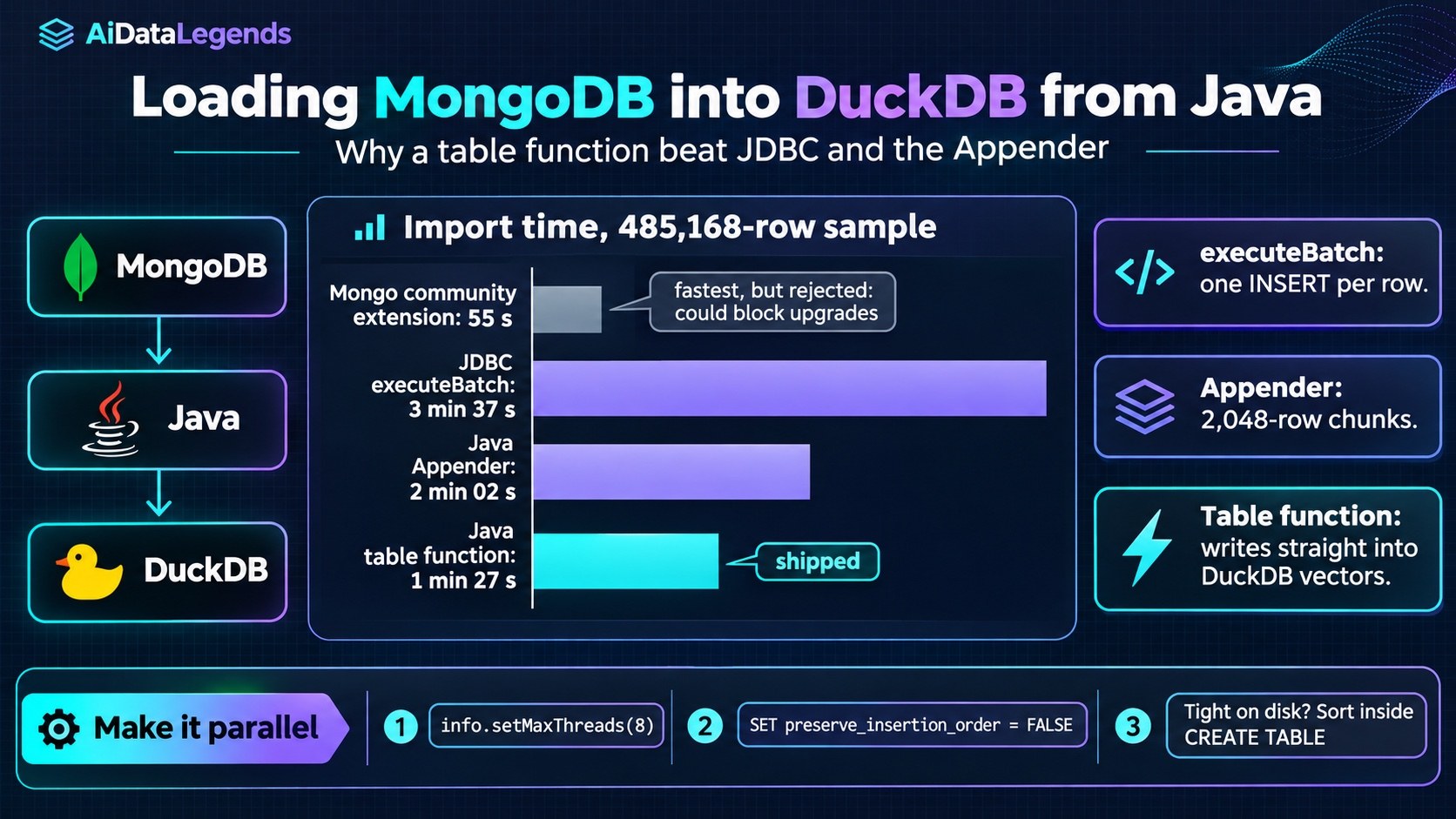
A team storing vulnerability data in MongoDB moved a year of records into DuckDB, on the same server, to make its analytics screen and Excel exports fast. Getting the data in turned out to be the hard part. A guest post on the DuckDB blog walks through every Java loading method they tried, with timings on a public sample dataset, and explains why the one they shipped is a table function written in pure Java [1]. If you load data into DuckDB from a JVM application, it is a useful map of what each API really costs.
Why it matters
The obvious answers were not the right ones. JDBC batch inserts are the standard Java way to bulk load, and the Appender is the API DuckDB’s documentation recommends for bulk inserts [2]. Both were too slow here. The fastest route, a community extension, was ruled out for maintenance reasons. The table function approach gives Java teams a way to stream data from any source straight into DuckDB’s query engine, without staging files and without maintaining C++ code.
The setup
The targets were demanding: every analytical query in one second or less, and a 50,000-row Excel export in under ten seconds. DuckDB had to run on the same server as MongoDB and work well with limited resources [1:1].
The published sample has 485,168 records with 24 fields. Two text columns are large, with median lengths of 5,000 and 2,500 characters and some values up to 32,000 characters, which makes every copy and sort expensive [1:2]. The Java examples split the import into day-sized batches fetched from MongoDB in parallel, then sorted the result into the final table, because sorting drastically reduced the database file size [1:3].
What happened
| Method | Sample import time |
|---|---|
| Mongo community extension | 55 s |
JDBC executeBatch, 8 workers |
3 min 37 s |
| Java Appender, parallel workers | 2 min 02 s |
| Java table function, 8 threads | 1 min 27 s |
All three Java times include the final sorted CREATE TABLE ... AS ... ORDER BY, which took about 30 seconds in the JDBC run [1:4].
The extension was fastest, and rejected. The mongo community extension imported the sample in 55 seconds, and the team called it the easiest and most performant option. They passed because community extensions carry no future-proof guarantee: if the extension is not updated, it can block DuckDB upgrades. Building it themselves would have meant maintaining a C++ fork [1:5].
JDBC batches pay per row. executeBatch is implemented in Java: the statement is prepared once, but each row still runs as a separate database-level INSERT. That made it 3.5x slower than the extension [1:6].
The Appender batches, but not enough. The Appender does real batching, building a 2,048-row data chunk in Java and flushing it in one call. It was still 2x slower than the extension, or 1.5x without the final sort, which was not acceptable on production data [1:7].
The table function won among the Java options. After reading the extension’s source, the author found it used table functions, and rebuilt the same idea in Java [1:8].
How it works
A Java table function is registered with DuckDB and then queried like a table: CREATE TABLE staging.vuln1 AS FROM vuln_import(from_date, to_date). DuckDB calls the function’s apply method repeatedly, and each call writes up to 2,048 rows directly into DuckDB’s column vectors. The import ends when the function returns zero rows [1:9].
Two settings make it run in parallel [1:10]:
info.setMaxThreads(8)tells DuckDB the function supports concurrentapplycalls.SET preserve_insertion_order = FALSElets DuckDB use those threads. Without it, DuckDB keeps calls on one thread to preserve order.
On production data, disk space was tight, so the team used a non-parallel version and put the ORDER BY in the same CREATE TABLE query, avoiding an intermediate copy. That matched the extension’s import times [1:11]. The result is an ingestion pipeline in pure Java that they can adapt to other sources.
What data and AI engineers should do
- Skip
executeBatchfor large loads. It runs one INSERT per row under the hood. - Use a table function when the source is a Java API. It feeds DuckDB’s vectors directly and lets DuckDB parallelize the work. The sample code is in the
staticlibs/duckdb_java_data_importrepository [1:12]. - Decide where sorting happens. A separate sort step is simple and parallel but needs disk space for a second copy; sorting inside the
CREATE TABLEsaves space at the cost of parallelism. - Weigh extensions by maintenance, not only speed. A community extension can be the fastest option and still be the wrong dependency.
Limitations and open questions
This is one team’s experience on one server. The comparison is not apples to apples: the extension imported a CSV file in one statement, while the Java methods used day-sized queries against MongoDB plus a sort step, and the author notes that day-sized batches can be uneven [1:13]. A file-based route (export to NDJSON, CSV or Parquet, then load) was abandoned for lack of disk space, not because it was slow, so it may still suit teams with more storage [1:14].
Key takeaways
- On the sample, a Java table function loaded data in 1 min 27 s, against 2 min 02 s for the Appender and 3 min 37 s for JDBC batches. [1:15]
- JDBC
executeBatchstill runs one INSERT per row, which makes it the slowest option. [1:16] - Parallel table functions need
setMaxThreadsandpreserve_insertion_order = FALSE. [1:17] - The Mongo community extension was fastest (55 s) but was rejected because it could block DuckDB upgrades. [1:18]



Discussion
Join the discussion: create a free account or sign in to comment.
No comments yet.